Showing posts with label security. Show all posts

Wednesday, 20 November 2024

Considerations for an OrderCloud (commerce) project

Unfortunately this year I didn't end up making it to Symposium, which was bitterly disappointing as it would have been fantastic to also attend the MVP Summit. Though I had prepared a presentation which was accepted by the Symposium team, it was designed to be (and required to be) co-presented with a client who ended up withdrawing. So while I didn't get to present (and I may hopefully yet at a SUG in the new year), I figured I would share the content in a blog post.

Undertaking any sort of enterprise site build is generally a mammoth effort, but when you factor commerce into the mix it can quickly become exponentially more complex, and risky - since there are now direct cost implications. Fortunately I'm here to report that if you keep things reasonably simple, and understand the tools you're working with - in our case, mainly Sitecore 10.2 (headless) and OrderCloud - it's all very much achievable. In our case, the build (for release 1) was around 8 months, which I personally feel is on the quick side.

Preparation

Documentation & Architecture

The first (and in my opinion most important) thing in any project is the preparation, and that means understanding your requirements in detail, and documenting them somewhere easily available to the full team (and any other partner teams who might end up working on the project). Make sure you have very good BAs involved, and I would highly recommend a wiki, or at least something which allows users to comment so that they can ask for clarification on any points that they don't understand, and the page can be updated with further information as it becomes available.  The documentation of business requirements should be as thorough as possible from the start, so that further planning and build (see sections below) can be based on it and prevent any (potentially major, time-consuming) changes if anything is missed.  It's very easy to say "we need the ability for users to apply coupon codes" without realising the deep deep rabbit hole promotions can very quickly become, for example.

Another key first step in any project is to understand (and potentially select) the tools with which you will be working; make sure they provide the capabilities necessitated by your business requirements (documented above); and put together a solution architecture so that everyone knows and understands how the information is flowing.  In our case, like most commerce builds, they key tools involved were:

  • Identity provider
  • PIM (source of truth for product info)
  • CMS (or DXP if you want to be fancy)
  • Middleware (optional)
  • Payment gateway
  • Order management
  • Downstream systems such as invoicing or analytics

In our case it was a bit of a rebuild, so the identity provider, PIM, and downstream systems were already in place; Sitecore 10.2 was already in use, so would also be used to enhance the product info; OrderCloud was selected for order management; and the client chose to go with a BFF (backend-for-frontend) pattern (using .NET 8) to support the frontend and extend the OrderCloud APIs.

It's worth pausing a second to reflect on the fact that there are both positives and negatives to having a BFF, particularly when you're using Next.JS for your "head" (which also provides server-side functionality). Personally (obviously heavily project-dependent) I think you can get away without one, but it can certainly come in handy.

  • Positive: It can be re-used between frontends, such as websites and mobile apps
  • Positive: It can be useful to have an extra layer to extend the OC APIs, merge product data with data from Sitecore, and handle exceptions
  • Positive: It can be used to house webhook endpoints called by OC (eg. on order submission)
  • Positive: It can be separately, and more rigorously, secured
  • Negative: It requires additional server(s) and infrastructure management
  • Negative: It's an extra layer, and one more thing to think about, when you already have "backend" Next.JS API endpoints available

OrderCloud

Another important consideration during preparation is around authentication, considering that OrderCloud provides SSO via OIDC.  In our case we were already using next-auth and another identity provider for other client sites, and SSO between the client sites was a requirement, so rather than rewrite all the client sites to use OC as the identity provider we opted to use OrderCloud impersonation in the BFF layer. It's great that OrderCloud provides flexibility by providing both these options.

Once you've documented your business requirements you will hopefully understand all the attributes and metadata that are associated with your products, and may recognise that you have a parent-child relationship between products. I have documented extensively the options available in OrderCloud around variants and parent-child products so I won't touch on it again here, however I'd highly recommend a read if you haven't already looked into it. Once you have a solid understand your product data I'd highly recommend creating a spreadsheet outlining: whether the data is read-only or can be modified by authors, what the expected values and lengths are, and whether the data is going to be stored in OrderCloud (ie. as Product xp data) or a separate system such as Sitecore. As you may be aware, Product xp has a max limit of 8000 characters, which may seem like a lot but can quickly and easily be used up and is not recommended for things such as rich text. My recommendation would be to use it only for data on which you will be searching / sorting / filtering products, and store the rest in Sitecore where you have almost unlimited flexibility (see build tips below on a note about sync'ing).  One key thing to note here is that if you want to give users the ability to sort products based on price, you will need to store the price in product xp data.  This is probably the biggest limitation I have come across in OrderCloud, but in our case it was easily surmountable as products had quite simple pricing, plus we had the added benefit of the BFF layer to house extra logic, so we were lucky this time. 

The final aspect of OrderCloud planning I'll touch on is the webhooks / integration events available. You should certainly familiarise yourself with the Order Checkout integration event, which is used during calculations (eg. tax), validation (eg. promotions), and of course order submission, so you probably won't be able to get away without implementing this one.  The other one which we found extremely handy is product synchronisation, which is fired whenever a product is created or modified, and can be handy to calculate and populate xp values (see paragraph above). This is fired for both parent and child products, and also when a product's price schedules are modified, so it's an extremely handy tool to have in your back pocket.

Project Planning

I'm no Project Manager, but it would be remiss of me to neglect to mention project planning in the preparation phase. Ensure you have your boards / user stories / tasks in whatever tool you use, and make sure your epics and sprints are defined, or you've at least understood the main phases of the project.  As I touched on in the foreword I would highly recommend launching an MVP (whatever that means for your project) and quickly following that up with a second release to flesh out the functionality, just to reduce complexity of the initial build, and keep timelines manageable.  

Key components of a commerce site you'll want to factor in: product listing page (PLP) including search / sorting / filtering, product details page (PDP), wishlist (optional), cart, checkout, confirmation, previous order listing, and of course all your standard web pages along with banners, carousels, rich text, and the like.

Build Considerations and Learnings

I feel at this stage (at least at the time of writing) Sitecore has gone all-in on Next.JS (before you comment: yes it seems this is likely to change in the near future), so depending on when you're reading this it's likely you've selected the Next.JS route, however it's still important to understand whether you're going SSR or SSG, what your ISR interval will be (how often are your products or content changing?), where your logic will live (Next.JS APIs?), and of course where your head is going to be hosted.

Additionally, authentication can be more complex than you expect, especially if you require SSO between other sites in the same ecosystem. As mentioned above, we went with the next-auth route (I'm keen to know what other options others may have gone with, let me know), but it's important to keep your auth and OC token in sync (if you're not authenticating through OC, at least).  Make sure users are logging out of both, anon carts potentially being deleted, and of course sessions and tokens are ending at the same time.

You may have content or products which should change or show/hide depending on your visitors' region, as we did. You can, of course, take advantage of the browser geolocation API, but if you happen to be running XP (as we were) you can also take advantage of Sitecore's geo-IP lookup - just don't forget to enable geo-IP in your Sitecore license.

If you're building a commerce site one of your primary considerations will likely be getting your products sold, so SEO should be front of mind. Of course you should aim for a fantastic pagespeed score, use the usual HTML and opengraph metadata, and have a sitemap, but also consider using microdata such as Product to enhance your page markup.  If you're migrating from a previous commerce implementation, or regularly removing products, you should also factor in setting up redirects from previous product URLs to your new product URLs, or just to PLP, as Google penalises 404 responses.

Tips and Tricks

  • Get used to working with an OC token (JWT) and using impersonation - your token is your context user (with specific permissions allowed), and even in the OC Portal you are actually using impersonation and have a token
  • OrderCloud xp properties are case-sensitive - OrderCloud will happily allow you to add price and Price which may not be very obvious when you go to deserialize/read it from your code
  • OrderCloud allows you to move users between Buyers, however you can’t move users with “open” orders (you must ensure they are "completed")
  • Make sure your BAs and developers are familiar with order of operations eg. promos are applied before tax is calculated
  • If you want to read Cart data (as opposed to Order data), there is a hidden (or at least not well documented role) that you will need: UnsubmittedOrderReader
  • Get used to writing a lot of loops: OC will only let you retrieve 100 items at a time
  • Facet values returned in the metadata are based on the first 50 results
  • Try to avoid using the .NET decimal type in xp - you might try to store 0.5m but end up seeing 0.5000001 stored in the xp
  • Webhook secrets have a 50 character limit
  • There is nothing stopping you from having a negative total, so make sure you cap your promotions
  • For guest/anonymous users, you cannot add items to a cart once it has been submitted. You must get a fresh token and create a new cart.
  • Don’t forget to assign your checkout integration event to your API client(s) otherwise you might end up wondering why it's not firing
  • For product facet values: take advantage of ProductSync events to create custom xp values which correspond with the facet values you need (eg. Price Range $100-$200)
  • Create publish event handler / publish webhook in Sitecore to sync data from Sitecore to OC, so that you can take advantage of in-built OrderCloud search/filtering features (if you're not using a third-party search tool)
  • Always validate your payment in the backend. This can be a good opportunity to patch your payment with Accepted=true.
  • Whenever you add a new cart line item, or patch the cart or a cart line item, you must call the order calculate method. Before submission you must also call order validate. Whenever you add a payment you must also (again) call order validate before you submit (ensuring that your payments with Accepted=true add up to the order total).

Testing

Performance should always be a key consideration throughout any project, and hopefully also being tested throughout, but there will likely be a specific load testing phase. Like any project, scale your servers appropriately (automatically if you can) and I would recommend notifying the OC team when you are planning to conduct your load tests so that they don't send concerned emails your way.  A key thing to note is that OrderCloud implements throttling in non-production environments (and don't publish any metrics around how throttling is implemented) and we certainly hit this during our testing. 

Depending on your code, you could implement their Throttler or just aim to reduce the requests you make to OC as much as possible. An example would be instead of using a loop in your code to GET individual products by ID, perform a single GET with ?ID=id1|id2|id3. We didn't end up needing to cache data but that is certainly an option depending on your load and the frequency with which your data changes. 

Finally, use a filter over a search where possible. Instead of ?searchOn=ID&search=id1 just use ?ID=id1. This applies to pretty much any entity.

Security is also hopefully also always front of mind by all architects and developers, but likely you will have a penetration testing phase of the project. Make sure that any security tests don't make it through to OC - ie. make sure that any user fields, query strings, or anything else that might end up in API calls to OrderCloud is sanitised. Sitecore/OrderCloud has a usage policy which prohibit testing of their services, and testing of your application may inadvertently appear as though you are testing OrderCloud.

Additional security considerations:

  • Make sure you are using a secret string for your webhooks (secret) / delivery configurations (secret) / integration events (hash key) which you are validating in the backend - note that some of these fields have a 50 character limit
  • You may also need to allow OrderCloud access to your webhooks through things like CloudFlare or WAFs.  If you are using CloudFlare, you may want to also additionally validate the webhook secret using a CloudFlare worker. After sending a request via email, the OrderCloud team kindly (and quickly) agreed to implement a user-agent which we found was previously causing the requests to be blocked by default WAF rules. Thanks so much guys!
  • OrderCloud is PCI compliant (assuming you don't go doing something silly like storing credit card data in xp)

Release

The release for every project will likely be different, so I won't dive into too much detail. Assuming you have ensured you have your environment variables are up to date with things like OrderCloud marketplace ID, API keys, webhook URLs, and secrets, most of your focus will be on other systems such as Sitecore or your "head".  Like any release, you will hopefully have a release plan outlining the various systems and order in which they will be deployed, and OrderCloud will likely be towards the beginning as it likely does not have many - if any - dependencies.

One thing I would highly recommend is having a script to create or update the data for your environment(s), whether they be non-production or production.  This could be in the form of a Node or .NET script, or a simple Postman collection that you run.  Note that entities need to be created in a certain order (eg. catalogs before categories before products) and that when creating a new environment from scratch you may have a couple of manual steps, such as copying the API keys (which have IDs generated on creation) to impersonation configs.

After Launch

Of course, things don't end after launch! It's important to sanity check not only your visitor-facing content (and check for any broken links) but also monitor how things are running behind the scenes.

Make sure you keep a close eye on, at least:

  • your server metrics, 
  • your logs,
  • analytics - your visitor count, and any purchase data,
  • your pagespeed score, 
  • your SEO ranking

It's not specific to a commerce implementation, but you should always ensure that you have sufficiently detailed logging to allow you to debug issues. Make sure you're not just logging that an error occurred, but who triggered it, what they were trying to do, and any other context which you may need to associate the debug log with an email or support ticket that customers may raise. When you're dealing with a commerce site you have the

Finally, ensure you scale your servers based on your metrics (or better yet, implement auto-scaling) to ensure you're not over-spending!

Conclusion

While undertaking an enterprise commerce site build can be a mammoth and daunting task, having a solid understanding of your requirements and tools, as well as keeping things simple for first launch, can go a long way to keeping things manageable (dare I say enjoyable?).  Sitecore has been around forever at this point, its capabilities are well known and documented, and they play very well when cooperating with OrderCloud (a relatively new player by comparison). While OrderCloud has a couple of limitations (which may affect you more than it did us) it is an easy to use, flexible, and performant solution, which should allow you to get up and running quickly and painlessly. If in doubt, reach out to Sitecore and see if you can get access to an OC Solution Engineer to assist with you on your journey.

This ended up being quite the essay, and I considered breaking this into multiple blog posts, but hopefully it's easy to skim and come back to later where required to refresh your memory. Hope you enjoyed the read and got something out of it. Good luck on your commerce journey!

Sunday, 8 October 2023

Security & Permissions with headless Sitecore

Security is a big headline these days (and should always be in the forefront of anyone's mind) and when it comes to content permission and user authorization the Sitecore "monolith" has always provided these capabilities out-of-the-box; however with the giant shift to headless over the last couple of years (or more) and now the move to SaaS these have grown vastly more complicated than the simple out-of-the-box content-permission-setting capabilities we used to know and love.

The issue

So why is it that things are now more complicated?
With the move to headless and composable, we have more of a separation of concerns - in this case, separation of the authentication/authorization, the display (/render) of content, and the provision of content.  This is most evident (technically, at least) in the use of REST and GraphQL by the headless code to retrieve content from the CMS (or DXP if you want to be fancy) where renderings were previously automatically provided their content by Sitecore.

The Sitecore "monolith" provides all 3 of these capabilities: 

  • Auth* through old ASP.NET users/roles, Federated Authentication, or Sitecore Identity 
    • Authenticates and assigns roles to user for authorization
  • Display/render of content through .NET MVC controller/view renderings (let's not talk about webforms or XSLT)
    • Authorizes user by checking permissions set on content in Sitecore XM
  • Provision of content through (amongst other things) datasources provided and consumed by the renderings 

In the new headless/composable world, these would be:

  • Auth though a separate identity provider (IDP) such as Okta / Auth0 / OneLogin / MS Entra
    • Authenticates and assigns roles to user for authorization
  • Display/render of content through headless SDKs such as Next.js (using REST / GraphQL)
  • Provision of content from Sitecore XM / Content Hub / Content Hub One

Notice something missing in the second list? Hopefully you did, as it's highlighted in bold in the first list!
There is now a disconnect between the roles assigned to the user by the IDP, and any roles you create in Sitecore / the permissions set on content.

This disconnect has no doubt been encountered by anyone working in a headless environment which requires their users to log in, and I have seen a few examples of how various people have thought about / tackled a solution. The following sections outline my approach.

A solution

There are 2 gaps mentioned above, and in case you missed them these are:
  1. A disconnect between roles assigned to a user by the IDP and roles in Sitecore (ie roles assigned to content)
  2. No out-of-the-box capabilities by the headless SDK to determine whether users are authorized to view content

You might be thinking "but both the GraphQL and REST endpoints support authorisation!". This was my initial thought, and I spent quite a bit of time deep diving into whether this was a viable option (ie. calling the layout service / GraphQL using the authenticated user details from the headless code). Let me save you a lot of time and headache: short of a quick and dirty option (simple logged in / not logged in user content, for example by swapping which API key you use to call the layout service) this isn't going to be an option you can use for anything serious.

I have seen other solutions which propose mapping the permissions (ie. roles <=> content) in a separate system, however my preference was to keep this within Sitecore. Sitecore XM still offers a flexible and robust ability to assign which content should be accessible by which users/roles, and building this again / finding a separate solution just seems like extra effort for no reason. I also personally do not feel like using this existing functionality goes against the spirit of composable at all. This mindset was the foundation for the remainder of the approach below.

I'm not going to dive too deeply in to the first point in the list above - suffice it to say there will need to be a way to ensure your roles in Sitecore match the roles assigned by your IDP. There are at least a couple of options:

  1. Configure role serialization, dynamically generate a yml file containing the roles, and dotnet sitecore ser push it
  2. Create an API endpoint on your Sitecore CM which calls System.Web.Security.Roles.CreateRole()

The meat of the dev work required, as far as I'm concerned, lies in exposing the roles and consuming them as part of authorization in the headless code.

Exposing the permissions

After setting the content (item) permissions (an out-of-the-box Sitecore XM exercise), the first thing that needs to be done is exposing these permissions. Content is consumed by the headless code either via the layout service, or GraphQL, so these are the 2 scenarios that need to be covered.

GraphQL: 

The quick and dirty way is to patch out the standard field filter, and add the security fields into your schema.
Note: this is not going to work if you're using Edge (/XM Cloud).

If you want a version which is compatible with Edge / XM Cloud, you'll want to create your own "faux security" field (you might call it "permissions"), and copy the standard (__Security) field value to this custom (permissions) field in a item:saved event handler. See this stackexchange answer for an example of a similar event handler.

Layout service: 

See sample repo

The layout service filters out all the standard fields (including __Security) in the FieldFilter method of JssItemSerializer (or whichever item serializer your site is using) so we will need to patch that out and add our own filter.
We then want to serialize our security field in a more readable format, which we can do in a custom SecurityFieldSerializer.

After this is done we can see all the __Security fields in our layout service result!

Authorization in Next.js

When it comes to Next.js, authentication really comes down to next-auth which has a host of IDP plugins out of the box (or you can develop your own easily enough if you really need / want to).  Authorization, however, is a custom exercise.  Long story short: once the SDK has called the layout service, the headless code needs to parse the permissions and prevent the user from seeing the page, or hide the appropriate content on the page from the user. 

Again, there are 2 parts to this: security at a page level (not authorized to view the page) or at a component level (hide a component from the user by removing it from the layout).

These can both be accomplished largely by customising normal-mode.ts (at least in Sitecore 10.2) with a helper to parse un-formatted security fields.

Page level (lines 68-74) and component-level (lines 77-80):

In the former we simply check the page security field, and in the latter we loop through all placeholders and check the security field set on the datasource.  This does not necessarily cover 100% of your use cases (components without datasources for example) but the rest can certainly be implemented in a similar fashion.

Conclusion

Securing certain content - to be shown only for authorized users - has been a site requirement for almost as long as the web has been around.  The advent of headless and/or composable mandates a new way of thinking and new approach to securing your site content.

With the logic provided above you should be able to both cover the vast majority of your permissions cases, as well as have a solid foundation for custom use cases where permissions might be needed within each of your components.

If you've made it this far - firstly thanks for reading! - I hope you learned something new today, or maybe re-enforced something you already knew. I'd love to get your feedback either way, so please leave a comment below, whether it's in agreement or some constructive criticism!


Wednesday, 10 May 2023

Locking down requests from Sitecore to Head

For those coming from on-prem or PaaS the leap to the exciting new world of Sitecore SaaS can be quite daunting, with many new factors and considerations - not the least of which is security (which should always be front-of-mind).  Your dev teams may be busy brushing up on containers and headless, but infra teams will be more concerned with integrating with XM Cloud, most notably with the Head.

Most of you will (hopefully) already be familiar with a couple of the ways that communication between the Head and Sitecore can be secured:

  1. A Sitecore API key - allows you to lock down your API calls to the Layout Service and GraphQL endpoints, as well as impersonate users.
  2. The JSS Editing Secret - used as a shared key to ensure the app and Sitecore Editor are the only parties authorized to talk to one another while in Experience Editor mode.

But what if you want a bit of extra security? Say you have a WAF (something to that effect) which only allows certain headers? As always, Sitecore is nice and extensible:

The class making the HTTP call to your Head app is Sitecore.JavaScriptServices.ViewEngine.Http.RenderEngine and it creates a HttpClient to make the requests using Sitecore.JavaScriptServices.ViewEngine.Http.HttpClientFactory which has the following method:

public IHttpClient Create(HttpRenderEngineOptions options)
{
	Assert.IsNotNull(options, "options");
	return new TimeoutCapableWebClient(options.RequestTimeoutMs)
	{
		Encoding = Encoding.UTF8,
		Headers = { [HttpRequestHeader.ContentType] = "application/json" }
	};
}

This HttpClientFactory is created through DI, so you can just inject your own and add your own headers! Too easy!

Friday, 17 November 2017

Microsoft Tech Summit Sydney (Day 2)


Day 2 was much the same as day 1, with similar quality speakers and content (but a shorter day).  Overall there was a great amount of material, and I'm very glad I made it along.  I'm looking forward to checking out and making use of some of the preview tooling and features that'll be released in the next few months.

DevOps best practices for Azure and VSTS

Simon Lamb started off by stating that we shouldn't need dev-ops teams, that everyone should be dev-ops, and that Microsoft believes in services in any language, any platform, for all developers.
Microsoft defines dev-ops as the "union of people, process and products to enable continuous delivery of value to our end users", highlighting that it's measurable and deliverable.  Great reasons to implement dev-ops are: competition is already doing it, increase velocity, reduce downtime, reduce human error through automation.  Your options provided by MS are: TFS (on prem, upgrade yourself), or VSTS (cloud, automatically upgraded).  VSTS also has release documentation with the features which have been added and updated, and you can switch on or off 'preview' features in your profile

The demo was a new MVC project (with tests) pushed to a git repo in VSTS. The 'continuous delivery tools for Visual Studio' extension creates a web app, build definition and release definition.  Simon went through the Release templates and tasks (as well as failing the performance test if response time was 5sec+), and swapping slots.  He ran the build, viewed build logs, highlighted that you can link the build/release back to code changes, view test results, and see release that was executed; you can also send a release summary email from release.

You can run a hosted build/release agent which is handled by MS, runs in a clean environment every time, and you can see the state (variables etc.) after each build.  You can also run a private agent, which is on your own build machine.  Deployment groups, which are a new addition, provide you with registration scripts (available for Windows or Linux) which will auto-download and install on your machine, and run phases in parallel on all machines in the group 

Simon then demonstrated how easy it was to also work with Java and VSTS, through either Eclipse or IntelliJ.  He ran through the usual process of viewing work item, commiting to feature branch (a policy was implemented which meant no committing to master); he went into VSTS to create a PR which he then approved to run the build and release (which was set to auto-run when master successfully built). He highlighted the policy which meant that a commit must correspond to a work item, must have a comment, and can't break build.  

The final demo was a Node.js project using VS Code with with Azure/VSTS extension.  You can create a web app straight from VS code. The continuous deployment Azure blade on the web app creates your build and release definitions in VSTS. 

Drive Azure governance with Policy and Cost Management

This was another session by Alistair Speirs, who began by acknowledging that in the past costs were very complicated and painful to manage (bills, 3rd party tooling, APIs).  These days Azure has integrated Cloudyn, which can be used over more than 1 subscription and makes life easier for those who have to manage lots of projects (and heaps of resources).  It's not just for Azure, but "all 3 cloud providers" (the other 2 being AWS and Google), and you can have a different policy per platform if you want. Cloudyn also uses the RBAC model that Azure employs.  Typically it's been extremely difficult to split costs for shared resources or costs like ExpressRoute, security, ingress / egress, but with Cloudyn it's very easy and customisable. Different teams also have a different dashboard.  On-prem we typically over-provision to leave room for growth, but in the cloud it's all about cost-saving by not over-provisioning. Cloudyn has tools to help you optimise your resources, as well as reports, and you can schedule this to be before your budget.

He demonstrated the Cloudyn interface, which did look very simple to use: you open the dashboard from cost management in portal. The cost by service, cost by region, ability to create monthly reports were all demo'd.  

Cost management is typically "someone else's problem", but Azure wants to prevent this facilitate things by bringing visibility, which brings accountability (and allows you to set budgets and set forecasts). You can make changes in the Portal and see resulting cost changes practically straight away. You can also set alerts, and now get notified of anomalies. Tagging is also a great way to aggregate your costs, so don't forget to tag.

Azure also now has Reserved Instances where you can pre-purchase 1 or 3 years worth of compute for a massive discount.  

Alistair concluded with the promise that the policy and cost tooling will come together, and Azure Advisor will improve.

Azure Infrastructure and application monitoring

John Pritchard and Rebecca Lyons both presented this session, which I think was one of my favourites.

John kicked things off by outlining that monitoring means different things to different people; that monitoring in the cloud means getting an overall picture of all your resources, which can be spun up/down at will, and that some resources might not even exist by the time you're looking at the logs. You need: visibility (activity / metrics), insight (alerting / mapping) , optimisation (App Insights).
 
John demonstrated: service health, activity log (across subscription, summary, save queries), metrics (network in / out for scale sets), metrics preview (storage account API calls which had failed), edit alerts, alerts with actions (eg. deployment failed), log alert support request (a new feature), create real time metric + compound metric (CPU+network) into activity group (eg. SMS/email/service now/ITSM/custom).  He also went into Log Analytics to demo custom searches, show multiple result sets with a line graph (comparing individual computers against logical group of computers, on-prem vs Azure).

Rebecca took the App Insights portion of the session, highlighting that bugs are hard to find and that's where Azure can help.  She took us through an example site (Fabrikam Fibre), and demonstrated the Application Map in App Insights: this shows what’s talking to what, dependencies, overall health, availability, and recommendations, out of the box.  There's also a new and improved performance dashboard, and Azure shows you stats 5 mins before and after an error to help you can reproduce any issue; you can then create a new work item with pre-populated details directly from the error in the Portal.  She demo'd the Users Usage feature, which lets you group your users by page, geography, etc. and provides a very nice chart.  The User Flows is another fantastic feature which shows the path of your users through the site through site, so you can see what's being used the most and focus your attention where it's needed.

New Azure platform capabilities

Katy Olmstead ran us through some of the features of the Azure portal, but I mainly focused on the newer functionality.  Don't forget to go to https://preview.portal.azure.com/ to have all the preview functionality enabled!  

One of the first things to note is that you can use Azure CLI or Powershell directly in the browser by clicking the icon in the top right (between alerts and settings).  Unfortunately for us here in Australia it looks like this requires setting up a storage account in Southeast Asia, which is more than a little annoying.
There are also a bunch of keyboard shortcuts for power-users, which you can view by clicking the help icon (question mark in the top right), then 'keyboard shortcuts' link.  In the same section you can show your new users a guided tour.
Don't forget search, all services

Up next was a demo of creating an app, and ARM template deployment.  Azure Monitor lets you view all monitoring, real time alerting, and diagnose issues.

Use resource groups for your primary method of grouping resources (based on the lifecycle of the resources) but don't forget tags (key-value pairs) which can also be used for searching and billing.  The columns in every view are also all customisable

Again, as with most other sessions, it was highlighted that Azure has the most comprehensive resiliency and best SLA including 99.9% single-instance.

Advisor is a great tool (which apparently just went public) for optimisation, offering personalised recommendations using machine learning, for cost or performance. It learns as you use Azure.  You can see recommendations and act on things right now, or snooze (eg. for a dev environment). You can also download it all as CSV or PDF to go over as a team and prioritise for a later date.

Service Health is a more reactive tool for diagnosing symptoms ("is it a Microsoft issue, or is it me?"), understanding the impact, and getting notified.  It can be integrated with web hooks, and provides a tracking id (to let you know that MS is aware of the issue).  You can also always tweet @azuresupport who are apparently a very large and active team.  
Planned maintenance lets you know about anything within 30 days that might impact you, and will shortly give you the ability to control the time window and pick the time of the maintenance of your resources (so you can schedule any down-time to be out of hours).

The Resource Health blade on most resources shows shows status, last changes, solutions to common problems (recommended steps), and allows you to troubleshoot issues; you can also report if you think the status listed is incorrect.

There are 4 levels of support: developer (low severity only), Azure Standard (for production, 24/7), Azure ProDirect (shorter responses), Microsoft Premier (enterprise-wide proactive support).

Thursday, 16 November 2017

Microsoft Tech Summit Sydney (Day 1)

This week I was fortunate enough to make it to the Sydney Microsoft Tech summit, over Thursday 16th and Friday 17th of November.  There were some great speakers and plenty of excellent material, as well as some fun partner booths, not to mention the Vive, Hololens, and Xbox stands which were always in use.  I thought I'd share some notes and pictures from some of the sessions I attended (it might be a bit disjointed, it's all from a bunch of bullet points).


Implement a Secure and Well-Managed Azure Infrastructure

This session was a high-level introduction into the world of Azure security.  Scott Woodgate started off by saying that as soon as you put even 1 VM onto the public internet you should be thinking about security (it'll be hit 100k times in the first month), and that security is a joint responsibility between Microsoft and the customer.  Microsoft manages things like the physical assets, data-center operations, and cloud infrastructure; the customer should focus on their actual VMs, applications, and data.  Azure has security built into it, but there are plenty of 3rd party options; obviously Microsoft is pushing their option as the better solution.

He then ran through Security Center, which focuses on visibility ("what have I got?"), identification & mitigation ("what do I fix?") and detect & respond.  Security Center gives you ranked issues in order of severity so you can see what you need to fix right now more clearly.  Microsoft has a giant list of known bad actors, their region, and known attack paths. The Investigation Path was an amazing feature of Security Center which shows you, if you've been attacked and breached, the way the hackers managed to access and traverse your network, so you can secure and fix every part.  If you upgrade to the paid Security Center you can also enable JIT management ports, which allow you to only open your management ports (eg. RDP, SSH) on-demand, and only with administrator approval.

The next topic was backup, and as you may know Azure backs everything up to 3 places in the same site - Microsoft expects hardware to fail and this is built in.  Even deleted backups are retained for 14 days in case you end up deleting something by accident.  As the first thing a hacker might do wen they pwn your network is delete your backups, Scott demonstrated how Microsoft has this great method of preventing backups from being deleted from an pwned machine, because you need a PIN (and can also set up MFA) to run the delete backup command.  Backing up is easy, can be scheduled, and is 'hot' so can be restored quickly (using backup vaults) as opposed to some other services.

Scott was adamant that security is a CEO-level issue, even though it's often overlooked.  The challenge with any network is understanding what went wrong, especially when the knowledge about the initial architecture and setup may be gone (when the employee(s) who built it left the company).

Azure Log Analytics was the next topic: this covers everything from one VM, to entire systems, to a code line item (ie. application performance monitoring); it's all stored in the same place, and under-pins everything in Azure.  It's highly-scalable, low latency, has text search and relational queries, and you can query it in a T-SQL-like syntax (easy to learn) as well as build charts, and use machine learning across it.

The Service Map looked like an amazing feature, showing everything in one place: connections / services / ports; you can see incidents (plus related/affected services) in real time. It apparently uses a kernel-level driver to analyse packets. You can also view failed requests on app or VM, can dig into (for example, 500) error codes, and for each issue you can create a work item in VSTS. You can also drill down into which areas of your site your users frequent more often.

Keynote: Microsoft Azure: Cloud for All

Next up was the keynote, where speaker Julia White put a big emphasis on productivity, hybrid, intelligence, and security.  She mentioned that the cloud brought challenges, but that Microsoft was there to be both shield and partner; they believe in open source, and that the cloud must be available for all.  There's lots going on, and this can be overwhelming; Microsoft/Azure wants to help everyone with this challenge, plus help in staying secure, and help everyone be as productive as possible

Productivity
There are lots of interconnected tools to help with this: Azure itself, Visual Studio (/Code), VSTS; everything from tooling to management to security (and dev ops).  Azure has 100+ services, including some of the newer ones like functions, logic apps, Kubernetes.  She compared developers to artists, and their IDE as their paintbrush, so Visual Studio (and Code) are top shelf offerings, with lots of integration to 3rd party apps and dev ops, they want to make life as easy as possible for us.
This section's business example was UPS: they use Xamarin to be cross-platform with a single codebase, and bot as service in Azure (plus app insights which can scale).
Julia re-iterated Microsoft's commitment to open source, last year being Github's biggest open source contributor.  She also demo'd a Powershell browser module which you can use while navigating the Portal, which actually looks very handy.
The demo for productivity was the biggest M-series VM - an absolute beast - with 128 virtual cores, and allowing for nested virtualisation.
With Azure you can be productive by managing multiple computers, in cloud and on-prem; you can also use log analytics to create scripts across multiple machines (in this example, correlate CPU spikes).

Hybrid
Microsoft pushed that migrating to Azure is a lot more cost-effective than alternate cloud providers, but also that hybrid isn't about migrating to the cloud, it's about one consistent experience. Today, it's all about the intelligent cloud and intelligent edge, bringing machine learning etc. from the cloud to on-prem (or close enough). It was also highlighted that SQL migration back and forth from on-prem to the cloud is easy, and reusing existing licences from your on-prem environment can save you 50%, which is a good incentive.
With Azure Stack you can run the cloud experience (same look because it's the same code!) in your data centre, keeping emphasis on cloud-first in a disconnected environment (eg. an oil rig, cruise ship fleet management). It could also be used due to certain industry regulations, or for a modern front end to a mainframe. EY uses it in Russia for legal regulations. The existing tools make it easy to deploy to Azure or Azure Stack.
DocuSign was the business example: "trust is something you earn in a lifetime and lose in an instant" was a quote that resonated with me. They needed the ability lift and move to the cloud with no / minimal change, and ability to scale, and Azure provided this.

Intelligence 
AI should be available for - and usable by - everyone, development and organisation alike.  We need access to good data, and good APIs; the business needs to collect the data and Azure provides the APIs.
ASOS was the example business in this case, who is a digital-only company, and always-on. They have 85k products, 4k added per week. They use microservices, machine learning, and use this for example to show relevant products to create a better experience. They use CosmosDB low latency better elasticity.
The (fantastic) demo for intelligence was an insurance bot: it showcased language detection, suggestions to the customer, voice & camera recognition used for verification, looking up your account history to know about family and make suggestions, car recognition (to show that it identified the car picture you uploaded was not the model you stated it was), sentiment analysis (knows you aren't happy, connects you to live person to continue the sale). On the backend you can see everything in Dynamics 365, including the user flow and recommended actions for a live customer to take to make the sale (in this case offer a discount)

Trust
Microsoft highlights that Azure has more certifications than any other cloud vendor, and is also working with many governments (including here in Australia). It has datacenters in 42 regions, which can be good for controlling where your data is being handled, and to keep things close to where your employees are located. Australia now has 4 regions (2 new ones coming online in Canberra)!
They do provide data centre tours, and a quick video showed that the locations are carbon neutral and have tonnes of security.
Julia pointed out that these days you're not just defending against hackers but nation-state attacks. All Azure's cloud services are built for security, and that they invested $1billion in the last year into security, and that's just going up.  Security centre gives you recommendations, because it's hard to keep up with the latest attacks, and Microsoft is there to be first responder.  Security centre shows you how secure you are, and how to respond when you're attacked; it has the investigation graph (covered above) and provides playbooks for recommended actions.
Azure has great cost management for visibility and accountability. You can split on resource group and tag. You can also get "reserved" VM instances where you pre-purchase 1 or 3 years of compute to save overall.
The final business example was Cabcharge: this is obviously a very disruptive area. They evaluated 16 vendors and ended up with Azure. They wanted PaaS, to keep their .NET skill set, and have something future-proof. They brought all development in-house with (now) 7 agile teams who work to an MVP and improve each sprint; they are language-agnostic and only requirement is TDD with code-coverage. Their struggle is to digitise non-digital tasks like hailing a cab, and not needing a bank account to purchase a ride using the app. The main point they said to take away was to think about what makes you different and focus on your strength.
Julia's final point about trust was that 90% of Fortune 500 companies are on Azire!

Migrating Infrastructure to Azure - VMs, Network + AD

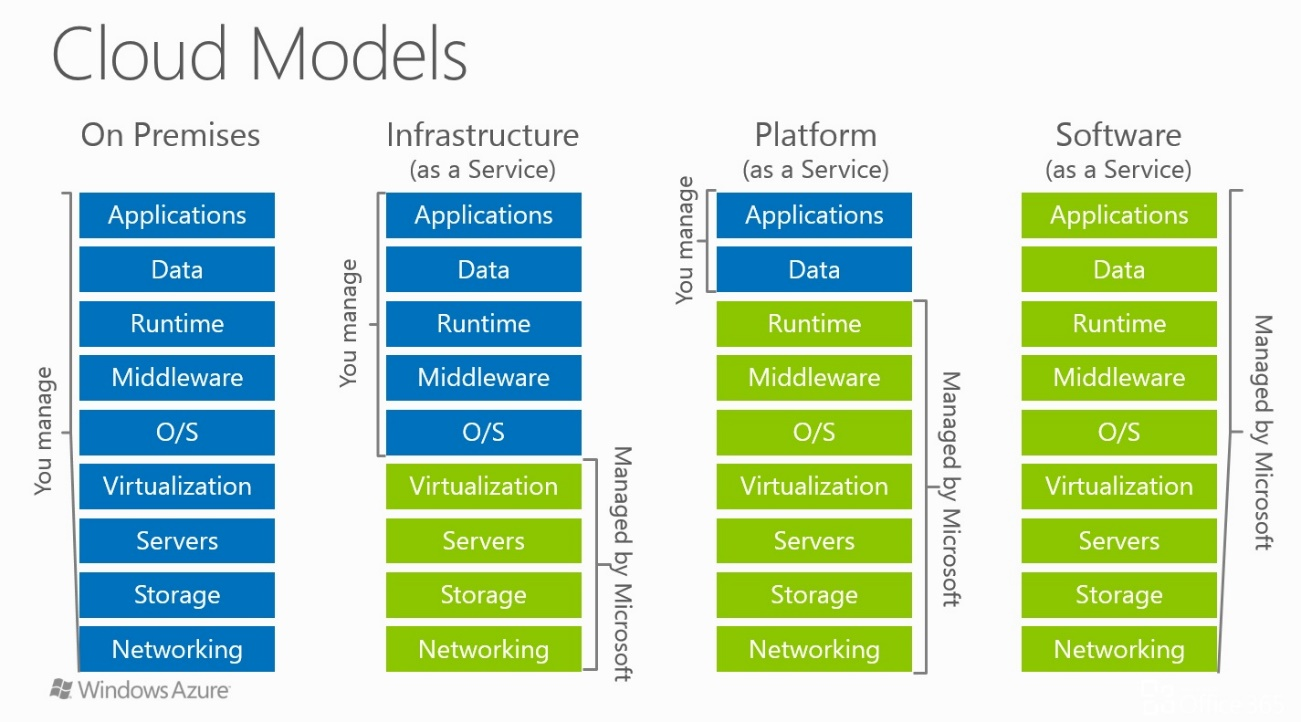
This session was presented by John Pritchard, and John started by showing the IaaS to Saas chart that hopefully you've seen before, stating that generally an organisation first migrates to IaaS because it's easier but it's not necessary.  He re-iterated what I'd heard in a previous session: that Australia Central 1+2 (in Canberra) will be coming first half of next year; this is connected to the ICON high speed government network, and offers secure services at SCEC zone 4 protection ('protected' to 'secret' level). This will only be for Azure, not Office or Dynamics yet. Though it's located in Canberra, it's not a government data centre, but will be used (mainly to start with) federal and state government, partners and suppliers.

Identity, management and security, platform, and development each have a corresponding cloud-based alternative, and Microsoft is trying to facilitate the transition by utilising your existing knowledge base.  Azure has everything: compute, storage, networking; now security and management / monitoring.  Virtual machines are similar to what you're used to on-prem, networking is the same, but scale sets allow you to grow easily.  There are a tonne of different VM types: from general purpose, to burst, to nested virtualisation etc.  There are 4 levels of availability: single (99.9% SLA), availability set (99.95%), availability zone (new, 99.99%) and region pairs.  The different storage options were then outlined, and file sync (a new service) was mentioned - this makes keeping files in sync with the cloud even easier.  The different connectivity options were then outlined (I won't go into detail here).

The first demo showcased how easy it was to spin up a VM: create network & subnet to put it in, create VM (reuse license for discount on Windows server; you can auto shut down with notification), then add various storage disks.  Storage is locally redundant 3x behind the scenes, but can be made up to geo-redundant; premium disks are SSD for high IOPS; standard are HDD for general-purpose; managed are how Azure makes life easier, and can be premium or standard. 
The second demo was a VNnet to VNet communication both via VPN gateway and peering. Peering is much quicker to set up and lower latency, and will soon be cross region. Azure can show you a VNet diagram, and you can use the network watcher for topology, flow control, packet capture (formerly netmon), and a connectivity check.

Finally John quickly went over site recovery, which is usually to paired region. It can be run on a live production environment without interruption, and doesn't have anything running in secondary region until failover (saving you money). You can manually failover and test failover. Behind the scenes Azure sets up a recovery plan.

Simplify hybrid cloud protection with Azure Security Center

This was the second session from Scott Woodgate, and a deeper dive into the security aspects of Azure and walkthrough of Security Center. He reiterated that Security Center is a SaaS offering for VM, on premises (using an agent), and PaaS.

The first time you set up Security Center, you will see a welcome screen where the first step is to turn on data collection. Within SC, Azure uses machine learning based on logs sent from agents, and you can use an existing workspace or create new one. You select how much data you want to collect, the default is minimal. Don't forget to turn it on for all subscriptions! Policies determine what info is relevant (eg. dev is less important, doesn't matter if some errors slip through), but policies extend beyond security centre. For example, in prod subscription disks must be encrypted. You can also save a policy and apply it to multiple subscriptions. Microsoft is investing lots of time and money into governance.  You can set up Security Center to give you emails and alerts, and there's 2 tiers: free (the basics) or standard (including threat protection and lots of other advanced options).

Within the compute section you see prioritised recommendations, and can select to fix one, some, or all (including on-prem VMs which are represented with a purple icon). SC tracks OS vulnerabilities, system updates, and loads more and provides heaps of info and suggestions with more Linux info coming in the next few months.  You can use Qualys (& other 3rd party) integration to check and ensure that certain software is installed on your VMs.

Regarding networking, Scott emphasised the necessity to have NSGs on all subnets.  Security Center shows you which VMs are public facing, and again provides lots of actionable info.  For storage it's the same deal, and covers things like SQL and storage encryption.  SC also covers applications, and Microsoft recommends putting a WAF in front of your apps whenever possible.

In adaptive threat protection you can enable just-in-time access, to enable approval for, and time-cap, your SSH or RDP access, and/or white list IPs. This is important as there are roughly 100k attacks in the first month that you enable a public facing VM in the cloud.  The activity log also shows access attempts so you have an audit log of who requested access and (tried to) access your machines. One of the more advanced tools is app whitelisting (formrely applocker), which is apparently under-utilised because it used to be difficult. Now Azure learns what apps you usually have running in 'audit' mode, then you can turn on 'enforce' mode to ensure no other apps are installed or processes are run. Azure will also recognise similar machines (eg. VMs in a scale set) and recommend you use the same settings for them.

Microsoft has a list of known bad actors updated in real time (SC is a cloud service so it's always up to date), and the demo walked through a few examples of attacks and how Azure links these to known botnets and hacker networks in the Threat Intelligence Map, along with providing a full PDF report on some of the botnets and how to deal with them. SC has built-in anomaly detection, and Wannacry was detected in somewhere around 1hr so that it could be acted upon by Azure customers. SC Fusion merges incidents into one attack profile, and lets you view the 'kill chain' so you can fix every aspect the hackers messed with. We then got to see an example of real attack and analyse how the attacker got in (RDP brute force) and see the chain of destruction they left (further ingress into the network, querying user data from AD).

Regarding dealing with issues in SC, the suggested fixes (playbooks) are logic apps, so you can work off the ones provided or create your own.  You could, for example, update Service Now, or post to Slack when an attack happens.

Migrating your applications, data, and workloads to Microsoft Azure

Allistair Speirs started by outlining that managing migration has always been about managing people, processes, and tech.  Generally around 80% of a company's budget in maintenance.  As has been mentioned in many of the sessions, Azure has a tonne of VM options, and lots of 9s in their various SLAs.  Obviously the more you move to Azure the lower the operational costs; it's a scale.

For on-prem you can: leave it alone, or implement Azure Stack;  for cloud you can: lift-and-shift (IaaS), lift-and-modernise (containers/web apps), or just go straight to a SaaS option.
What's getting in the way? Costing, the fact that it's complicated, and any necessary downtime.  There are 3 main steps: discover (which things to move first, which later, which need upgrades / patches), migrate, and optimise/modernise, and Azure has a few migration tools to help with all 3.

For migration: Azure Migrate (free for all Azure customers, mentioned further below), Azure Database Migration Service (free for all customers), Azure Cost Management (free for Azure customers), Azure Hybrid Benefit (for Windows Server, SQL Server, save up to 40% BYOL), Azure Databox (large storage data migration).

There's now an Azure Migrate tool in preview which maps dependencies in your on-prem environment, recommends VM sizes, provides a compatibility report, cost analysis, and recommends migration services. There is no agent required!  Azure then lets you have a free POC for 30 days to ensure it will all work.  

Allistair gave a brief demo of migrating vSphere, and mentioned the process is basically the same for HyperV.  Migrating using Azure Site Recovery (ASR) is the easist option for VMs. Migration is just failing over and not failing back, and as mentioned Azure provides the ability to run the failover environment for 30 days for free, so you can test and ensure it works.

Azure has integrated Cloudyn which you can use to monitor Azure / AWS / Google costs; it's free for Azure. This is great for isolating costs, but also splitting costs between departments (for example ExpressRoute which might be shared between all departments).

For lift-and-modernise, we're talking containers, CI/CD, microservices / server less, all of which Azure caters for. You can 10x savings this way, but obviously it's more effort, and better suited to projects still under development.

For storage, you've got your blob options: hot, cold (more for reads), archive (hrs to retrieve), as well as Azure file share SMB 10c/GB (and now file sync).  Azure data box also provides a 100TB bulk migration option which is encrypted, and provides chain of evidence that you've moved data.

For database you've got your PaaS or IaaS, SQL or no-SQL.  For assessing the migration you can use MS data migration assistant (discovers and provides migration recommendations).  For migrating  you've got the Database Migration service.  Migrating to a Azure SQL instance is the best option if it's possible, as it's totally managed, scalable, and more economical.

Information Protection with AIP

This one was nice and different for me, as I didn't have any background on AIP or its capabilities.  Lou Mercuri covered information protection both from an Office standpoint and in Azure.

In Word, you can "classify" a document as a classification level (set up in Azure below), using a dropdown in the ribbon.  Once this has been applied you can set a custom header, footer, or watermark depending on the classification level.  Classifying a document above your currently assigned level won't lock you out if you're the owner of the document.  Word will also pop up with a suggestion to classify the document based on key words as they are typed (without sending any info to the cloud). In Outlook once you attach a classified document it suggests that you also classify the email.

From an admin perspective, you manage it all in Azure, creating classification levels, custom user groups and assigning classification levels to them (or all users).  There is one super admin, and you can create one admin per classification level who can decrypt documents of that level.

Lou then ran through a few scenarios in Sharepoint and Salesforce through Microsoft Cloud App Security, outlining how a person who hadn't been distrusted should be able to access their document.  Examples of how the user could be blocked from viewing or downloading a document depending on whether they were on a managed device, or working from home, or accessing a certain-classification of document.  The user will also be notified that their “access to Salesforce is being monitored”.  You can also notify an admin via email or text if a user has tried to access a blocked document, and you can monitor all user actvitiy including these attempts.

Wednesday, 28 September 2016

It's always the simple things (a quick reminder about Sitecore access permissions)

Recently I inherited a project that has been ongoing for quite some time (so I'm not yet familiar with how it's been set up), and today I wasted a bunch of time debugging a general link field which wasn't generating the correct URL (in fact, it wasn't generating a URL at all!).  I figured it would be something simple, and sure enough it did turn out to be, but I got bogged down in the hunt long enough that I figured it was worth a post, on the off chance someone tries to search the same keywords I did (with no clues in the search results).

The general link field was on a datasource item, and was linking to another page on the site (ie using "Insert link" rather than "Insert external link" to create an internal link). This current project is using Glass Mapper (which I think distracted me a bit) and the Link.Url proprty was empty.  I thought maybe the field was being mapped incorrectly, but it all looked ok.  I tried grabbing the link field on the datasource Item directly (LinkField)RenderingContext.Current.Rendering.Item.Fields["MyLinkField"] and found that the InternalPath field was empty, and the TargetItem was null, even though the TargetID field was populated with the correct ID of the linked page.

Long story short, after digging through the code used to generate the URL I realised the Sitecore.Context.Database.GetItem("linkedItemId") was returning null, even though I could see the item in the Sitecore content editor.  Shortly thereafter it hit me: when would the context database return null for an item that obviously exists? When the current user doesn't have access to it! Yep that's right, the linked page had anonymous read access disabled, so that even though a link can be created by an author, the end user can see a link but cannot see the item and therefore the URL cannot be generated.

Moral of the story: if you can't get/see the link to an item, check the security and access permissions on that item!