For those of you who aren't aware, SXA comes with 3 main page sections: header, main, and footer. You can drag and drop components into these sections, add a partial design to a section (which then claims the entire section so you can no longer add other components to it), and select whether you would like a section to have a particular style (none, fixed, flex, row, or row container).


While working on a POC I came across a potential requirement to add an additional page section, and thought I'd investigate how difficult it would be. Why would you need to do such a crazy thing? Aren't 3 sections enough for everyone? I'm sure there are many reasons, but the one I envisaged was having a "flex" (ie full width) section between the header and main content for something like a banner, while the rest of the main content is fixed width. I'd say this is pretty common on a lot of sites, so worth some investigation. Yes it can be done purely through using the 'main' placeholder, but it's a lot more effort and probably requires your content authors to know a bit about containers.
Recommended reading: creating a custom grid - if you want to start a new grid from scratch (then come back here)
First step: figure out where the sections header, main, and footer are coming from.
For those familiar with SXA, you'll know you can find these listed in the fields for your theme item. You can inspect the fields for this template (/sitecore/templates/Foundation/Experience Accelerator/Theming/Theme) to find the query it's using
/sitecore/system/Settings/Foundation/#Experience Accelerator#/Theming/Enums/Placeholders/*||query:/sitecore/templates/Foundation/#Experience Accelerator#/Grid/#Grid Definition#/#Placeholder Styles#/*
or just do a quick search for 'header' or 'footer' , which works out to be (in my case, 9.2 or 9.3)
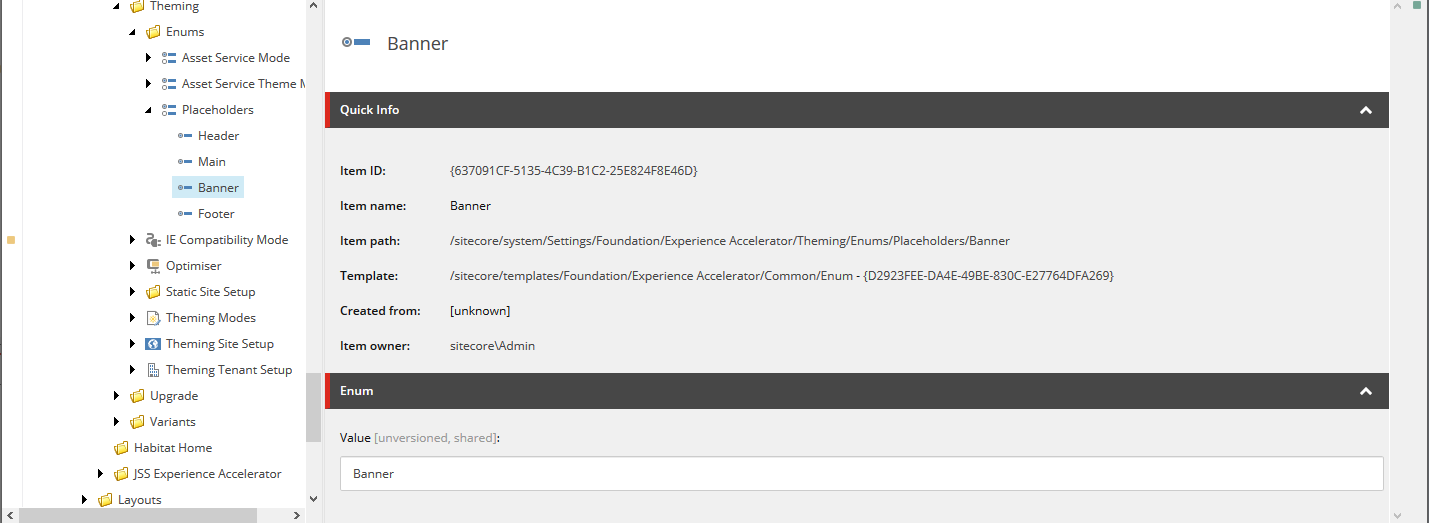
/sitecore/system/Settings/Foundation/Experience Accelerator/Theming/Enums/Placeholders
Nice, let's add a new enum in here called 'banner'.
To make use of this new enum, go back to the theme and update the Placeholders field to include your new enum and style.
In an ideal world it would be this easy, but unfortunately SXA leaves one more painful (and difficult to find) step for us: the grid layout cshtml. In my case I'm using Bootstrap 4, so this is \Views\SxaLayout\Bootstrap4Body.cshtml. Inserting the new placeholder is easy enough:
<main>
  @Html.Sitecore().Placeholder("banner")
  <div id="content" class="@Html.Sxa().GridPlaceholderClasses("main")">
    @Html.Sitecore().Placeholder("main")
  </div>
</main>
Now to save you a bit of a search, this file is referenced in /sitecore/system/Settings/Feature/Experience Accelerator/Bootstrap 4/Bootstrap 4 Grid Definition, which is then referenced by /sitecore/system/Settings/Feature/Experience Accelerator/Bootstrap 4/Grid Setup which is referenced in your site root node under Modules.
We want to ensure we're not changing any out-of-the-box SXA items, so duplicate the /sitecore/system/Settings/Feature/Experience Accelerator/Bootstrap 4 folder (up a level so it's just under Feature) and give it a different name and display name so that you know your references are pointing to your custom one. Don't forget to point your Grid Setup item to your new grid definition.
Back in the site root item Modules field add the custom item, move it up to the same position as the existing Boostrap 4 one so that any dependency ordering is kept intact, and remove the existing one.
Last but not least, the final hidden piece: in the Settings item under your site you'll find a "Grid Mapping" field which you'll want to update to the new grid.
Boom! New full page width section where we can chuck our banners.