Friday, 21 February 2020

xDB Migration Wizard - Complex Facets and Facet Lists

The documentation for mapping custom facets using the xDB migration wizard is quite good for simple facets (ie. 1-1 string field mapping between Mongo and xConnect), however I've come across a few clients now who have needed something a bit more complex - generally in the form of a facet list.

I'm going to assume that you've been through the documentation in the link above and successfully mapped one or more simple facets.

I'm going to run through the scenario of migrating a Contact facet called CustomFacet which has a IElementCollection<CustomObject> called CustomObjects in 8.x Mongo to a Contact facet called CustomFacet which has a Dictionary<string, CustomObject> called CustomObjects in 9.x xConnect. CustomObject has 2 fields:
  • Id: int
  • Start: DateTime
  • Name: string

NOTE: Before you do anything, make sure you've built and deployed your custom model(s).  Verify that the json looks correct, and all your properties are appearing in your json file!
Our json file looks like:
{
  "Name": "My.CustomModel",
  "Version": "1.0",
  "References": [
    {
      "Name": "XConnect",
      "Version": "1.0"
    },
    {
      "Name": "Sitecore.XConnect.Collection.Model",
      "Version": "9.0"
    }
  ],
  "Types": {
    "My.CustomFacet": {
      "Type": "Facet",
      "BaseType": "Sitecore.XConnect.Facet",
      "ClrType": "My.CustomFacet, ModelSerializer, Version=1.0.0.0, Culture=neutral, PublicKeyToken=null",
      "Properties": {
        "CustomObjects": {
          "Type": {
            "String": "My.CustomObject"
          }
        }
      }
    },
    "My.CustomObject": {
      "Type": "Complex",
      "ClrType": "My.CustomObject, ModelSerializer, Version=1.0.0.0, Culture=neutral, PublicKeyToken=null",
      "Properties": {
        "Id": {
          "Type": "Int32"
        },
        "Start": {
          "Type": "DateTime"
        },
        "Name": {
          "Type": "String"
        }
      }
    }
  },
  "Facets": [
    {
      "Target": "Contact",
      "Name": "Custom",
      "Type": "My.CustomFacet"
    }
  ]
}

our json in Mongo looks like:
{
    "_id" : LUUID("a1b928fb-1ba9-824c-8fa7-2b5bc92b36c9"),
    "Identifiers" : {
        "Identifier" : "fb28b9a1-a91b-4c82-8fa7-2b5bc92b36c9"
    },
    "CustomFacet" : {
        "CustomObjects" : {
            "1" : {
                "Id" : 58,
                "Name" : "My First Object",
                "Date" : ISODate("2020-02-20T07:28:36.376Z")
            },
            "2" : {
                "Id" : 57,
                "Name" : "My Second Object",
                "Date" : ISODate("2020-02-18T07:28:36.376Z")
            },
            "3" : {
                "Id" : 102,
                "Name" : "My Third Object",
                "Date" : ISODate("2020-02-17T07:28:36.376Z")
            }
        }
    }
}

I'll be using the Addresses facet as a reference, as this is very similar.  We'll just need to edit one file:

[SupportedIds(new string[] {"{85C3A33B-AAD7-4982-98E5-D67729DDBCA8}"})]
  public class CustomEntriesFromXdbListValueAccessorConverter : BaseItemModelConverter
  {
    public CustomEntriesFromXdbListValueAccessorConverter(IItemModelRepository repository)
      : base(repository)
    {
    }

    protected override ConvertResult ConvertSupportedItem(
      ItemModel source)
    {
      DictionaryEntriesFromDocumentValueReaderConverter valueReaderConverter1 = new DictionaryEntriesFromDocumentValueReaderConverter(this.ItemModelRepository);
      valueReaderConverter1.IgnoreValidation = true;
      valueReaderConverter1.DictionaryFieldName = "CustomObjects";
      DictionaryEntriesFromDocumentValueReaderConverter valueReaderConverter2 = valueReaderConverter1;
      valueReaderConverter2.FieldsWithValuesForTheKeysToExclude = new string[0];
      ValueAccessor valueAccessor = new ValueAccessor();
      ConvertResult convertResult = valueReaderConverter2.Convert(source);
      if (convertResult.WasConverted)
        valueAccessor.ValueReader = convertResult.ConvertedValue;
      return this.PositiveResult((IValueAccessor) valueAccessor);
    }
  }

Specify data to read from MongoDB

Navigate to /sitecore/system/Data Exchange/xDB Data Migration 8x to 9/Data Access/Value Accessor Sets/Providers/MongoDB and create the following items and fields:
  • MongoDB
    • MongoDB Contact
      • CustomFacet on MongoDB Contact
        Field Name:CustomFacet
        Converter Type:Sitecore.DataExchange.Providers.MongoDB.Converters.DataAccess.ValueAccessors.DocumentFieldValueAccessorConverter, Sitecore.DataExchange.Providers.MongoDB
    • MongoDB Contact CustomObject List
      Template:/sitecore/templates/Data Exchange/Providers/MongoDB/Data Access/Value Accessor Sets/MongoDB Document Value Accessor Set
      Converter type:Sitecore.DataExchange.Converters.DataAccess.ValueAccessors.ChildBasedValueAccessorSetConverter, Sitecore.DataExchange
      • CustomObject Entries on MongoDB Contact
        Template:/sitecore/templates/Data Exchange/Tools/xDB Data Migration Tool/Data Access/Value Accessors/MongoDB Non Preferred Entries from xDB List Value Accessor
        Converter Type:My.CustomEntriesFromXdbListValueAccessorConverter, My
    • MongoDB CustomObject Entry
      Template:/sitecore/templates/Data Exchange/Providers/MongoDB/Data Access/Value Accessor Sets/MongoDB Document Value Accessor Set
      Converter type:Sitecore.DataExchange.Converters.DataAccess.ValueAccessors.ChildBasedValueAccessorSetConverter, Sitecore.DataExchange
      • Id
        Template:/sitecore/templates/Data Exchange/Tools/xDB Data Migration Tool/Data Access/Value Accessors/MongoDB Preferred Entry from xDB List Value Accessor
        Converter type:Sitecore.DataExchange.Providers.MongoDB.Converters.DataAccess.ValueAccessors.DocumentFieldValueAccessorConverter, Sitecore.DataExchange.Providers.MongoDB
      • Date
        Template:/sitecore/templates/Data Exchange/Tools/xDB Data Migration Tool/Data Access/Value Accessors/MongoDB Preferred Entry from xDB List Value Accessor
        Converter type:Sitecore.DataExchange.Providers.MongoDB.Converters.DataAccess.ValueAccessors.DocumentFieldValueAccessorConverter, Sitecore.DataExchange.Providers.MongoDB
      • Name
        Template:/sitecore/templates/Data Exchange/Tools/xDB Data Migration Tool/Data Access/Value Accessors/MongoDB Preferred Entry from xDB List Value Accessor
        Converter type:Sitecore.DataExchange.Providers.MongoDB.Converters.DataAccess.ValueAccessors.DocumentFieldValueAccessorConverter, Sitecore.DataExchange.Providers.MongoDB

Specify data to write to xConnect contact facet

Navigate to /sitecore/system/Data Exchange/xDB Data Migration 8x to 9/Data Access/Value Accessor Sets/Providers/xConnect
  • xConnect
    • xConnect Contact
      • CustomFacet on xConnect Contact
        Template:/sitecore/templates/Data Exchange/Providers/xConnect/Data Access/Value Accessors/xConnect Entity Facet Value Accessor
        Facet Definition:Collection Models/xDB Data Migration Tool/xDB Migratino Collection Model/Facets/Contact/CustomFacet
        Mapping Set:Value Mapping Sets/MongoDB to xConnect Contact Mappings/MongoDB CustomObjects to xConnect Contact CustomFacet
        Converter Type:Sitecore.DataExchange.Providers.XConnect.Converters.DataAccess.EntityFacetValueAccessorConverter, Sitecore.DataExchange.Providers.XConnect
    • xConnect Contact CustomFacet
      Template:/sitecore/templates/Data Exchange/Providers/xConnect/Data Access/Value Accessor Sets/xConnect Entity Facet Value Accessor Set
      Converter type:Sitecore.DataExchange.Converters.DataAccess.ValueAccessors.ChildBasedValueAccessorSetConverter, Sitecore.DataExchange
      • CustomObjects on CustomFacet on xConnect Contact
        Template:/sitecore/templates/Data Exchange/Providers/xConnect/Data Access/Value Accessors/xConnect Entity Facet Dictionary Property Value Accessor
        Facet Property:Collection Models/xDB Data Migration Tool/xDB Data Migration Collection Model/Facets/Contact/CustomFacet/CustomObjects
        Mapping set:Value Mapping Sets/MongoDB to xConnect Contact Mappings/MongoDB CustomObjects to xConnect Contact CustomObjects
        Converter Type:Sitecore.DataExchange.Providers.XConnect.Converters.DataAccess.EntityFacetDictionaryPropertyValueAccessorConverter, Sitecore.DataExchange.Providers.XConnect
    • xConnect Contact CustomObject
      Template:/sitecore/templates/Data Exchange/Providers/xConnect/Data Access/Value Accessor Sets/xConnect XObject Value Accessor Set
      Converter type:Sitecore.DataExchange.Converters.DataAccess.ValueAccessors.ChildBasedValueAccessorSetConverter, Sitecore.DataExchange
      • Id
        Template:/sitecore/templates/Data Exchange/Providers/xConnect/Data Access/Value Accessors/xConnect XObject Property Value Accessor
        Converter type:Sitecore.DataExchange.Providers.XConnect.Converters.DataAccess.XObjectPropertyValueAccessorConverter, Sitecore.DataExchange.Providers.XConnect
      • Date
        Template:/sitecore/templates/Data Exchange/Providers/xConnect/Data Access/Value Accessors/xConnect XObject Property Value Accessor
        Converter type:Sitecore.DataExchange.Providers.XConnect.Converters.DataAccess.XObjectPropertyValueAccessorConverter, Sitecore.DataExchange.Providers.XConnect
      • Name
        Template:/sitecore/templates/Data Exchange/Providers/xConnect/Data Access/Value Accessors/xConnect XObject Property Value Accessor
        Converter type:Sitecore.DataExchange.Providers.XConnect.Converters.DataAccess.XObjectPropertyValueAccessorConverter, Sitecore.DataExchange.Providers.XConnect

Configure mapping from MongoDB contact to xConnect contact facet

Navigate to /sitecore/system/Data Exchange/xDB Data Migration 8x to 9/Value Mapping Sets/MongoDB to xConnect Contact Mappings
  • MongoDB to xConnect Contact Mappings
    • MongoDB Contact to Contact Model
      • CustomFacet
        Template:/sitecore/templates/Data Exchange/Framework/Data Access/Mapping/Value Mapping
        Source Accessor:CustomFacet on MongoDB Contact
        Target Accessor:Data Access/Value Accessor Sets/Providers/xConnect/xConnect Contact/CustomFacet on xConnect Contact
        Converter type:Sitecore.DataExchange.Converters.DataAccess.Mappings.MappingConverter, Sitecore.DataExchange
    • MongoDB CustomObjects to xConnect Contact CustomFacet
      Template:/sitecore/templates/Data Exchange/Framework/Data Access/Mapping/Value Mapping Set
      Converter type:Sitecore.DataExchange.Converters.DataAccess.Mappings.ChildBasedMappingSetConverter, Sitecore.DataExchange
      • CustomObjects
        Template:/sitecore/templates/Data Exchange/Framework/Data Access/Mapping/Value Mapping
      • Source accessor:
        CustomObject Entries on MongoDB Contact
        Target aceessor:
        Data Access/Value Accessor Sets/Providers/xConnect/xConnect Contact CustomFacet/CustomObjects on CustomFacet on xConnect Contact

  • MongoDB CustomObject to xConnect Contact CustomObject
    Template:/sitecore/templates/Data Exchange/Framework/Data Access/Mapping/Value Mapping Set
    Converter type:Sitecore.DataExchange.Converters.DataAccess.Mappings.ChildBasedMappingSetConverter, Sitecore.DataExchange
    • Id
      Template:/sitecore/templates/Data Exchange/Framework/Data Access/Mapping/Value Mapping
      Source Accessor:Id on MongoDB Contact CustomObject
      Target Accessor:Data Access/Value Accessor Sets/Providers/xConnect/xConnect Contact CustomObject/Id
      Converter type:Sitecore.DataExchange.Converters.DataAccess.Mappings.MappingConverter, Sitecore.DataExchange
    • Name
      Template:/sitecore/templates/Data Exchange/Framework/Data Access/Mapping/Value Mapping
      Source Accessor:Id on MongoDB Contact CustomObject
      Target Accessor:Data Access/Value Accessor Sets/Providers/xConnect/xConnect Contact CustomObject/Id
      Converter type:Sitecore.DataExchange.Converters.DataAccess.Mappings.MappingConverter, Sitecore.DataExchange
    • Date
      Template:/sitecore/templates/Data Exchange/Framework/Data Access/Mapping/Value Mapping
      Source Accessor:Id on MongoDB Contact CustomObject
      Target Accessor:Data Access/Value Accessor Sets/Providers/xConnect/xConnect Contact CustomObject/Id
      Converter type:Sitecore.DataExchange.Converters.DataAccess.Mappings.MappingConverter, Sitecore.DataExchange
  • Tuesday, 10 December 2019

    Adding a new SXA page section

    For those of you who aren't aware, SXA comes with 3 main page sections: header, main, and footer.  You can drag and drop components into these sections, add a partial design to a section (which then claims the entire section so you can no longer add other components to it), and select whether you would like a section to have a particular style (none, fixed, flex, row, or row container).


    While working on a POC I came across a potential requirement to add an additional page section, and thought I'd investigate how difficult it would be.  Why would you need to do such a crazy thing? Aren't 3 sections enough for everyone?  I'm sure there are many reasons, but the one I envisaged was having a "flex" (ie full width) section between the header and main content for something like a banner, while the rest of the main content is fixed width.  I'd say this is pretty common on a lot of sites, so worth some investigation.  Yes it can be done purely through using the 'main' placeholder, but it's a lot more effort and probably requires your content authors to know a bit about containers.

    Recommended reading: creating a custom grid - if you want to start a new grid from scratch (then come back here)

    First step: figure out where the sections header, main, and footer are coming from.
    For those familiar with SXA, you'll know you can find these listed in the fields for your theme item.  You can inspect the fields for this template (/sitecore/templates/Foundation/Experience Accelerator/Theming/Theme) to find the query it's using
    /sitecore/system/Settings/Foundation/#Experience Accelerator#/Theming/Enums/Placeholders/*||query:/sitecore/templates/Foundation/#Experience Accelerator#/Grid/#Grid Definition#/#Placeholder Styles#/*
    or just do a quick search for 'header' or 'footer' , which works out to be (in my case, 9.2 or 9.3)
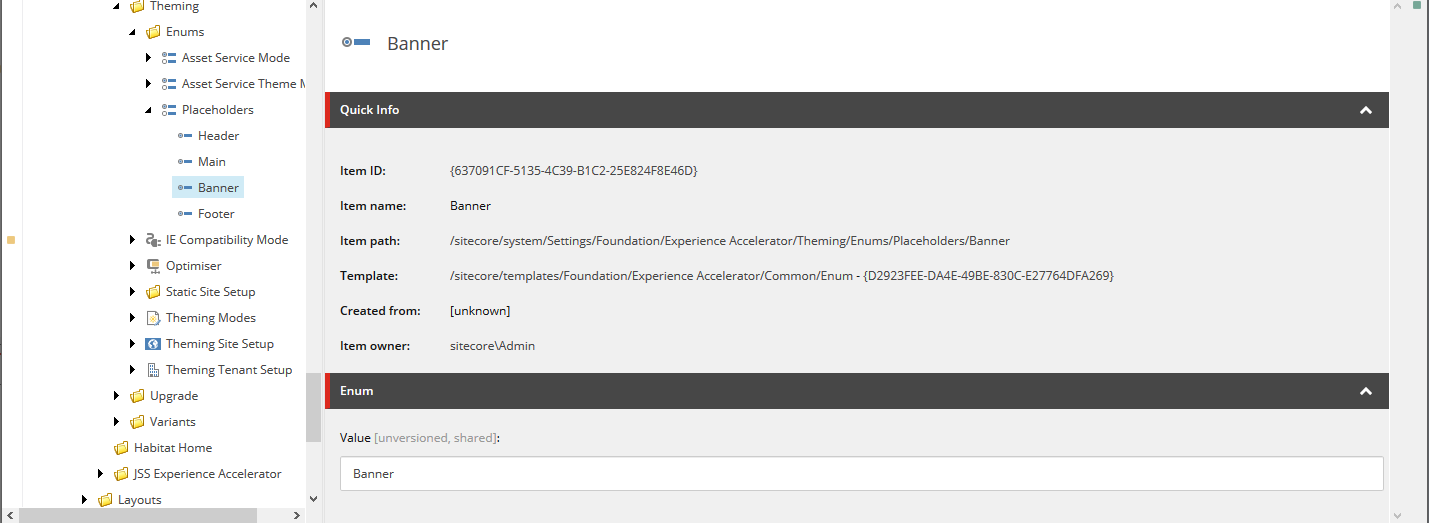
    /sitecore/system/Settings/Foundation/Experience Accelerator/Theming/Enums/Placeholders

    Nice, let's add a new enum in here called 'banner'.

    To make use of this new enum, go back to the theme and update the Placeholders field to include your new enum and style.

    In an ideal world it would be this easy, but unfortunately SXA leaves one more painful (and difficult to find) step for us: the grid layout cshtml.  In my case I'm using Bootstrap 4, so this is \Views\SxaLayout\Bootstrap4Body.cshtml.  Inserting the new placeholder is easy enough:
    <main>
      @Html.Sitecore().Placeholder("banner")
      <div id="content" class="@Html.Sxa().GridPlaceholderClasses("main")">
        @Html.Sitecore().Placeholder("main")
      </div>
    </main>

    Now to save you a bit of a search, this file is referenced in /sitecore/system/Settings/Feature/Experience Accelerator/Bootstrap 4/Bootstrap 4 Grid Definition, which is then referenced by /sitecore/system/Settings/Feature/Experience Accelerator/Bootstrap 4/Grid Setup which is referenced in your site root node under Modules.

    We want to ensure we're not changing any out-of-the-box SXA items, so duplicate the /sitecore/system/Settings/Feature/Experience Accelerator/Bootstrap 4 folder (up a level so it's just under Feature) and give it a different name and display name so that you know your references are pointing to your custom one.  Don't forget to point your Grid Setup item to your new grid definition.


    Back in the site root item Modules field add the custom item, move it up to the same position as the existing Boostrap 4 one so that any dependency ordering is kept intact, and remove the existing one.


    Last but not least, the final hidden piece: in the Settings item under your site you'll find a "Grid Mapping" field which you'll want to update to the new grid.


    Boom! New full page width section where we can chuck our banners.

    Friday, 9 August 2019

    SIF Distributed Installation notes/fixes

    I recently went through a SIF distributed installation for 9.1.1 and noticed quite a few things which were either broken, not included, or undocumented, so I thought I'd share my notes in case someone runs in to the same situation (which I'm sure will happen sooner or later).

    The broken

    Let's start with things that actually make SIF/Sitecore just plain not run successfully:
    • The distributed templates have not been updated for 9.1.1, so even when downloading the Sitecore Remote Distributed Deployment SIF Templates file from the 9.1.1 downloads page you will need to update the package names in the XP1-Distributed.ps1 file from 9.1.0 to 9.1.1, and Identity from 2.0.0 to 2.0.1
    • In XP1-Distributed.ps1 "SolrRoot" is defined but not passed through to the json file
    • In xconnect-xp1-MarketingAutomation.json "XConnectCollectionSearchService" should be "XConnectCollectionService" (in a couple of places), which is the parameter which is actually correctly passed through from the parent json
    • Unlike in the local SIF install, passwords and keys are not automatically generated if they are not provided.  Your DB passwords and API keys will all be set to use "SIF-Default" which is the default value for all the parameters in the json.  I'm putting this under "broken" since Sitecore logs multiple errors with a reporting API key of this value.
    • Even though the distributed install is set to install xConnect collection and xConnect collection search on different servers, it has not configured the necessary connection strings for separate servers per Setting up dedicated search and collection connection strings in the documentation. If you're getting the following error from Experience Profile this is what's been missed
      ERROR [Sitecore Services]: HTTP POST
      URL https://sitecorecms/sitecore/api/ao/v1/contacts/search?&pageSize=20&pageNumber=1&sort=visitCount desc&Match=*&FromDate=03%2F03%2F2019&ToDate=02%2F04%2F2019
      
      Exception System.NullReferenceException: Object reference not set to an instance of an object.
         at Sitecore.Cintel.Endpoint.Plumbing.NegotiateLanguageFilter.OnActionExecuted(HttpActionExecutedContext actionExecutedContext)
         at System.Web.Http.Filters.ActionFilterAttribute.OnActionExecutedAsync(HttpActionExecutedContext actionExecutedContext, CancellationToken cancellationToken)
      --- End of stack trace from previous location where exception was thrown ---
      ... etc...

    The missing

    •  While the packages for the DDS instance and CM DDS patch packages and json files are included, they are not incorporated into the XP1-Distributed.ps1 or XM1-Distributed.ps1
      • In the .ps1 define the following:
        $DdsComputerName = ""
        $DdsSiteName = "$prefix.dds"
        $DdsPackage = (Get-ChildItem "$SCInstallRoot\Sitecore 9.1.1 rev. * (OnPrem)_dds.scwdp.zip").FullName
        $PatchPackage = (Get-ChildItem "$SCInstallRoot\Sitecore.Patch.EXM (OnPrem)_CM.zip").FullName
        
        $ReportingServiceApiKey = ""
        $EXMCryptographicKey = ""
        $EXMAuthenticationKey = ""
        $EXMInternalApiKey = ""
        
        and in the DistributedDeploymentParams add:
        DdsComputerName = $DdsComputerName
        DdsUserName = $HostsUserName
        DdsPassword = $HostsUserPassword
        DdsPackage = $DdsPackage
        DdsSitename = $DdsSitename
        PatchPackage = $PatchPackage
        
        ReportingServiceApiKey = $ReportingServiceApiKey
        EXMCryptographicKey = $EXMCryptographicKey
        EXMAuthenticationKey = $EXMAuthenticationKey
        EXMInternalApiKey = $EXMInternalApiKey
      • Add the DDS and patch sections to the json (gist of full json). The main additions are:
        "DdsConfig": ".\\sitecore-xp1-dds.json",
        "DdsResourceFiles": [ "[variable('DdsConfig')]" , "[parameter('DdsPackage')]", "[parameter('LicenseFile')]", "[variable('CertGenerationConfig')]" ],
        "Dds:ResourceFiles": "[concat(variable('RepResourceFiles'), variable('XConnectCertImportResourceFiles'))]",
        "Dds:RemoteResourceFolder": "[variable('RemoteResourceFolder')]",
        "Dds:ImportCertificatesParameters": "[variable('XConnectCertImportConfigurationParameters')]",
        "Dds:GenerateCertificatesParameters": {
          "Path": "[JoinPath(variable('RemoteResourceFolder'), SplitPath(Path:variable('CertGenerationConfig'),Leaf:true))]",
          "CertificateName": "[parameter('DdsComputerName')]"
        },
        "Dds:ConfigurationParameters": {
          "Path": "[JoinPath(variable('RemoteResourceFolder'), SplitPath(Path:variable('DdsConfig'),Leaf:true))]",
          "Package": "[JoinPath(variable('RemoteResourceFolder'), SplitPath(Path:parameter('DdsPackage'),Leaf:true))]",
          "SiteName": "[parameter('DdsSitename')]",
          "XConnectCert": "[parameter('CertificateName')]",
          "ProcessingService": "[parameter('ProcessingService')]",
          "ReportingService": "[parameter('ReportingService')]",
          "XConnectCollectionSearchService": "[parameter('XConnectCollectionSearchService')]",
          "XConnectReferenceDataService": "[parameter('XConnectReferenceDataService')]",
          "MarketingAutomationOperationsService": "[parameter('MarketingAutomationOperationsService')]",
          "MarketingAutomationReportingService": "[parameter('MarketingAutomationReportingService')]",
          "SitecoreIdentitySecret": "[parameter('ClientSecret')]",
          "SitecoreIdentityAuthority": "[parameter('SitecoreIdentityAuthority')]",
          "SolrUrl": "[parameter('SolrUrl')]",
          "SolrCorePrefix": "[parameter('Prefix')]",
          "SqlDbPrefix": "[parameter('Prefix')]",
          "SqlServer": "[parameter('SqlServer')]",
          "SqlAdminUser": "[parameter('SqlAdminUser')]",
          "SqlAdminPassword": "[parameter('SqlAdminPassword')]",
          "LicenseFile": "[JoinPath(variable('RemoteResourceFolder'), SplitPath(Path:parameter('LicenseFile'),Leaf:true))]",
          "HostMappingName": "",
          "DNSName": "[parameter('DdsComputerName')]",
          "SSLCert": "[parameter('DdsComputerName')]",
          "ExmEdsProvider": "CustomSMTP",
          "ReportingServiceApiKey": "[parameter('ReportingServiceApiKey')]",
          "EXMCryptographicKey": "[parameter('EXMCryptographicKey')]",
          "EXMAuthenticationKey": "[parameter('EXMAuthenticationKey')]",
          "EXMInternalApiKey": "[parameter('EXMInternalApiKey')]"
        },
        "PatchConfig": ".\\sitecore-XP1-cm-dds-patch.json",
        "PatchResourceFiles": [ "[variable('PatchConfig')]" , "[parameter('PatchPackage')]", "[parameter('LicenseFile')]", "[variable('CertGenerationConfig')]" ],
        "Patch:ResourceFiles": "[concat(variable('PatchResourceFiles'), variable('XConnectCertImportResourceFiles'))]",
        "Patch:RemoteResourceFolder": "[variable('RemoteResourceFolder')]",
        "Patch:ImportCertificatesParameters": "[variable('XConnectCertImportConfigurationParameters')]",
        "Patch:GenerateCertificatesParameters": {
          "Path": "[JoinPath(variable('RemoteResourceFolder'), SplitPath(Path:variable('CertGenerationConfig'),Leaf:true))]",
          "CertificateName": "[parameter('CMComputerName')]"
        },
        "Patch:ConfigurationParameters": {
          "Path": "[JoinPath(variable('RemoteResourceFolder'), SplitPath(Path:variable('PatchConfig'),Leaf:true))]",
          "Package": "[JoinPath(variable('RemoteResourceFolder'), SplitPath(Path:parameter('PatchPackage'),Leaf:true))]",
          "SiteName": "[parameter('CMSitename')]",
          "EXMCryptographicKey": "[parameter('EXMCryptographicKey')]",
          "EXMAuthenticationKey": "[parameter('EXMAuthenticationKey')]",
          "EXMInternalApiKey": "[parameter('EXMInternalApiKey')]",
          "DedicatedServerHostName": "[parameter('DdsComputerName')]"
        }
        

    The undocumented

    • The WinRM is using UseSSL:true which means a cert needs to be installed and port 5986 opened.  See blog post WinRM over HTTPS for a Sitecore 9.1 SIF Distributed Installation for more details.
    • In our case the default WinRM MaxEnvelopeSizekb was tiny and needed to be increased for the Sitecore file sizes.
      winrm set winrm/config @{MaxEnvelopeSizekb="8192"}

    Minor others

    • Despite allowing you to set the install files path in the ps1 the RemoteResourceFolder path C:\ResourceFiles\ is hardcoded everywhere else
    • There are quite a few cases of the wrong description for fields (a case of copy/paste I believe), eg. in xconnect-ip1-MarketingAutomation.json the description for XConnectReferenceDataService should say "Reference Data" but says "Collection Search"